


MysteryHike: Travel & Explore
3.945.00 Reviews
App Specs
- Version
- 3.0.108
- Updated On
- License
- Free
- Downloads
- 100,000+
- Developer
- MysteryTech
- Categories
- Travel & Local
- Platform
- Android
Screenshots
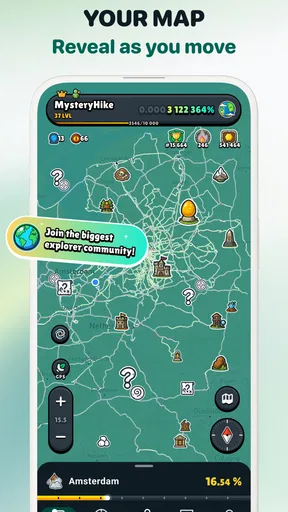
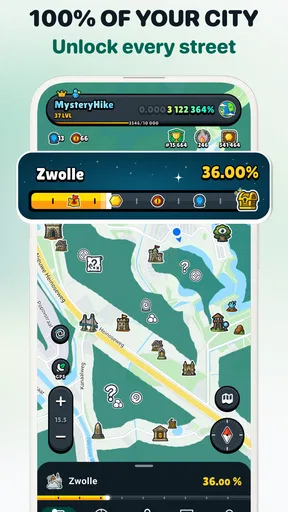
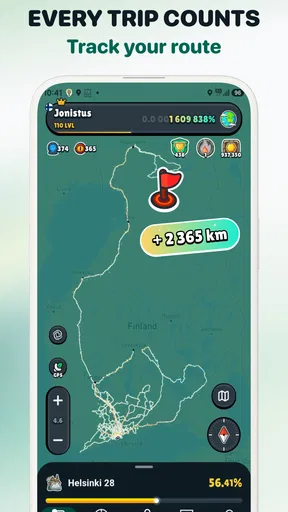

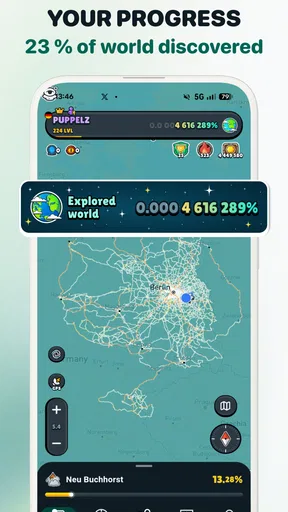
 Analysis by AppCompare
I tend to choose travel apps by asking one simple question: will this help me notice and enjoy a place, or will it just give me another screen to manage? MysteryHike: Travel & Explore is aimed at the first kind of outing. It turns exploring on foot into a themed activity, making it most appealing when the destination matters less than the pleasure of following a trail and seeing what you find along the way.
That focus makes it different from the usual map or trip-planning tool. I would not reach for it to compare routes between cities or organize every part of a holiday. I would consider it when I have time for a walk and want a reason to take an unfamiliar turn, explore a local area, or make an ordinary outing feel more like an adventure.
Choose it for the kind of walk you want
There are two useful ways to think about MysteryHike: as a guided experience when I want someone else to shape the outing, and as a creative prompt when I want to set the direction myself. The first suits a free afternoon when deciding where to go feels like more work than the walk itself. The second is for people who enjoy adding their own theme and making a route feel personal.
That distinction is worth considering before installing it. If you want a straightforward navigation app, a conventional map is likely the more practical choice. If you want a walking app whose main appeal is discovering a place through a mystery-led experience, this has a clearer reason to come along. Its value is not simply getting from one point to another; it is giving the walk a narrative purpose.
Getting Started with MysteryHike
First things first, downloading MysteryHike was a breeze. Available on both Android and iOS, the app's interface is intuitive and sleek. Once you fire it up, you’re greeted with a simple yet inviting homepage. You can either dive into a pre-planned mystery hike or customize your own adventure. I chose to dip my toes into both, just to give you the full scoop.
The Pre-Planned Adventures
The pre-planned hikes are perfect for those days when you’re craving adventure but want someone else to do the heavy lifting. The app uses your location to suggest hikes near you, each with a unique storyline. It’s almost like having a personal tour guide who’s a bit of a mystery buff. I tried one of the local hikes and was pleasantly surprised at how engaging the narrative was. It’s like stepping into a storybook, where you’re the main character.
This guided format is especially handy when I am visiting somewhere new and do not want to spend the first half of my free time searching for a walk. It gives the outing a natural rhythm: follow the experience, take in the surroundings, and let the story provide a reason to keep moving. I would treat it as an invitation to explore rather than a substitute for checking that a route suits my plans and the conditions on the day.
Worth Reading Before You Choose

EA SPORTS FC Mobile 26 Is a Bigger Football Game, but It Takes Time

Flipboard Shows What News Apps Must Do Beyond the Feed

Switching to Android Auto Means Rethinking Your Driving Routine

Google Calendar Makes a Crowded Week Easier to Manage

Ludo King Makes the Most of the Minutes Between Plans

Baby Panda World Brings Quick Play to Modern Phones, but Its Game Library Feels Busy
One practical way to get more from a suggested hike is to choose a time when you can afford to be unhurried. A mystery works best when I can pause to look around rather than rushing to finish it between appointments. If I am walking with someone else, I would also agree beforehand that the phone is there to support the outing, not to become the whole outing. That small expectation makes a difference: the setting remains the focus, while the story adds a layer of play.
Create Your Own Adventure
Now, for the DIY adventurers, MysteryHike offers a feature to craft your own hikes. You set the parameters: length, difficulty, and even the theme of your mystery. I went all out and created a spooky themed hike, and let me tell you, it was a blast. The app provides prompts and clues along the way, keeping the experience fresh and exciting.
Customizing a walk can be more useful than it first sounds. I would use a gentle theme for a family stroll or a lighthearted outing with friends, then save a more dramatic idea for a route where the surroundings can carry the mood. The trade-off is that a custom experience asks me to make choices up front. If I would rather start walking immediately, a pre-planned option is the easier fit; if I enjoy shaping the occasion, creating my own gives me a reason to revisit familiar paths with fresh attention.
It also helps to keep the plan realistic. A theme can make a short local walk feel special, but it cannot make an unsuitable route safe or comfortable. I would pick a route I already know is appropriate for the group, then use the app’s creative elements to add interest. That is a better approach than letting the desire for a dramatic adventure dictate where everyone goes.
Interactive Features
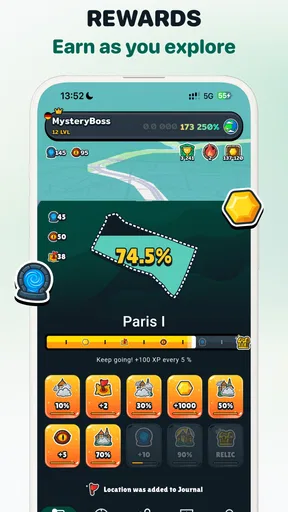
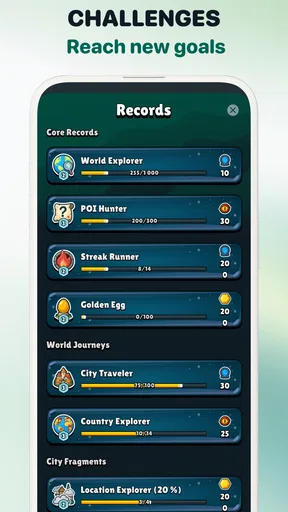
The app is packed with features that make each hike feel interactive. You’ll find QR codes scattered throughout the trails, which you can scan for more clues. I found myself eagerly searching for these little nuggets of information, making the whole experience feel like a treasure hunt. Plus, the app tracks your progress and rewards you with badges, which is a nice touch for all you achievement hunters out there.
The QR-code element changes the pace of a hike: instead of only following a route, I have a reason to stop, inspect a place, and see whether there is another clue to uncover. That is a genuine strength for people who like scavenger hunts, but it is also a specific trade-off. A group that wants a continuous conversation or a brisk workout may find the pauses distracting. I would choose the interactive format for a relaxed outing, not when my main goal is to cover ground efficiently.
For a family or a group with different ages, the clues can give everyone a shared task rather than leaving one person to lead and the rest to follow. I would still make sure that scanning a code happens somewhere safe to stop, away from traffic or awkward footing. The fun is in paying attention to the surroundings, so it makes sense to pause first and use the phone only when the spot is suitable.
Community and Sharing
Another cool aspect is the community feature. You can connect with other hikers, share your adventures, and even compete in challenges. I shared a few of my hikes and got some great feedback and tips from fellow users. It’s like being part of a virtual hiking club!
Sharing makes the app more appealing if I like collecting ideas from other walkers or want to show friends what I have been doing. It is less important for someone who prefers to keep outdoor time private or simply wants a tool that works without a social layer. I would approach challenges as an optional extra, not as a reason to walk faster or take a route that does not suit the day. The best use of a community feature is to find inspiration while keeping my own comfort and judgment in charge.
A realistic afternoon with the app
Imagine I have a free afternoon in a town I do not know well. I want to get outside, but I do not have a particular landmark in mind. I can look for a nearby pre-planned hike, choose an outing that fits my available time, and let the story give the walk a purpose. I would check the route and practical conditions before setting off, bring water, and leave enough room to pause at clues rather than treating the walk like an errand.
If I am back in my own neighbourhood, I might do the opposite: create a themed walk along streets or paths I already find comfortable. That avoids turning a spontaneous outing into a search for a perfect destination, while still giving the familiar area a new angle. For a friend who enjoys making up stories, the custom option could become a collaborative activity; for someone who dislikes phone-led experiences, I would choose a normal walk together instead.
These examples also show where the app is not the right choice. If I need dependable turn-by-turn directions for a complicated journey, I would use a navigation-focused alternative. If my priority is exercise tracking, I would choose a tool built around recording workouts. MysteryHike is at its best when the goal is a more playful walk, not when I need a comprehensive travel planner or a specialist fitness dashboard.
How it compares with other travel choices
Travel and local apps often fall into practical groups: maps for directions, itinerary tools for organizing a trip, and walking or activity apps for recording movement. MysteryHike sits closer to an experience than a utility. Its storytelling and clues give it a different purpose from a map, while its custom adventures make it more participatory than simply browsing things to do nearby.
That difference is useful, but it also defines its limits. I would not replace a map I rely on for navigation, nor would I expect a themed hike to handle every part of a trip. The sensible combination is to use the app for the activity and keep whatever ordinary planning tools I need for the rest. Someone who wants one app to manage transport, bookings, and sightseeing may find this too focused; someone who wants a walk to feel like an event may appreciate that focus.
On Android, the app is listed as free, with optional in-app purchases ranging from $2.99 to $59.99 per item. I would start with the free experience and decide whether I actually use the format before paying for anything. That is particularly sensible if I am unsure whether I prefer guided hikes or making my own, or if I only take occasional walks. MysteryHike is most worthwhile when its style fits how I already like to spend time outdoors.
Things to Keep in Mind
While the app is a treasure trove of features, just remember to keep your phone charged. The GPS and interactive elements can be a bit of a battery drainer. Also, some areas might have limited connectivity, so downloading the maps beforehand is a smart move.
These are practical concerns rather than reasons to avoid the app, but they matter more on a longer outing or somewhere unfamiliar. I would begin with a shorter walk to learn how the experience fits my routine, then plan more carefully if I intend to rely on my phone for a longer stretch. Keeping a charger or battery pack available is sensible when I expect to use location-based features, and checking route details before leaving reduces the chance of having to solve everything outdoors.
Oh, and a little tip from me to you: always pack a snack and some water. You never know when you’ll get caught up in the adventure and forget about the real world.
There is also a simple social trade-off to consider. A clue-based walk invites people to check their screens at particular moments, which may be exactly what a group wants or exactly what another group hopes to avoid. I would tell companions what kind of walk I have in mind before starting, especially if some are coming mainly to chat or get exercise. That way, nobody is surprised when the outing includes stops to follow the story.
Who should give it a try
MysteryHike is a strong match for curious walkers, visitors who want a more engaging way to explore, and friends or families who enjoy puzzles and shared activities. It may also suit someone who knows a neighbourhood well but wants a fresh excuse to wander through it. The strongest case for installing it is not that it replaces every travel app; it is that it can turn an ordinary walk into something people talk about afterwards.
I would skip it if I mostly need direct navigation, dislike using a phone while walking, or want an exercise app whose central purpose is measuring performance. I would also think twice before choosing it for a group that has little time or a fixed destination to reach. In those situations, a conventional map or a simple unstructured walk is likely to be less distracting.
For anyone wondering whether it is suitable for younger users, its content rating is Everyone. I would still choose the route and supervise the outing according to the people taking part; an age label does not replace ordinary care outdoors. The app’s playful framing is best enjoyed when the real-world plan is comfortable for the whole group.
Final Thoughts
All in all, MysteryHike: Travel & Explore is a fantastic app for anyone looking to add a little mystery and excitement to their outdoor adventures. Whether you're a seasoned hiker or just looking to try something new, this app offers a unique twist on the traditional hike. It’s engaging, user-friendly, and most importantly, it brings a sense of wonder back to exploring the great outdoors.
There is enough interest here to make it more than a novelty for people who enjoy narrative walks, but I would keep expectations tied to that purpose. It is a focused outdoor experience, not a universal answer to planning a trip. MysteryTech is the developer, and the app has an average rating of 3.9 from around 2.3 thousand ratings, with over 100 thousand installs. Those figures suggest it has found an audience, though my decision would still come down to whether I enjoy the format.
The current version is 3.0.108 and it requires Android 7.0 or later. It is free to install, with optional purchases, and carries an Everyone content rating. For me, the best reason to try it is simple: when I want a walk to feel less routine, the mystery gives me a small nudge to pay closer attention to where I am.
So, are you ready to embark on your own mystery hike? Trust me, you won’t be disappointed. Happy trails!
Pros
- Easy-to-use interface for all users.
- Comprehensive map with offline access.
- Engaging local community events.
- Customizable hiking plans.
- Real-time weather updates.
Cons
- Limited free features in basic plan.
- Occasional GPS accuracy issues.
- High battery consumption.
- Requires constant internet for updates.
- Ads can be intrusive and frequent.
FAQs for MysteryHike: Travel & Explore
What is MysteryHike: Travel & Explore?
MysteryHike: Travel & Explore is an engaging app designed to turn your outdoor adventures into exciting treasure hunts. It combines elements of exploration and gaming, offering users curated hiking routes peppered with mysteries and challenges. Perfect for those who love both hiking and solving puzzles, it makes each journey an unforgettable experience.
Do I need an internet connection to use MysteryHike?
While MysteryHike: Travel & Explore can be used offline, some features such as downloading new trails and sharing your achievements require an internet connection. It's recommended to download all necessary maps and data before starting a hike in case you encounter areas with poor connectivity.
Is MysteryHike suitable for all ages?
Yes, MysteryHike is designed to be family-friendly. The app offers different difficulty levels, making it suitable for all ages and skill levels. Kids can enjoy solving simpler mysteries, while adults can tackle more challenging quests, ensuring that everyone has a great time outdoors.
What kind of equipment do I need to use MysteryHike?
To fully enjoy MysteryHike: Travel & Explore, you will need a smartphone with GPS capabilities. Comfortable hiking gear is also recommended, as the app will guide you on varied trails. Having a portable charger can be beneficial for longer hikes to ensure your device remains powered.
How does MysteryHike ensure user safety during hikes?
User safety is a top priority for MysteryHike. The app includes features such as SOS alerts, location sharing with trusted contacts, and detailed trail information to help users stay safe. Always check weather conditions and carry necessary safety gear before starting a hike.


